InventoryOnline

Locations and Warehouses

Overview

Inventory → Inventory → Locations and Warehouses

The Locations and Warehouses system in Inventory Pro provides comprehensive management of physical storage facilities, warehouse operations, and location tracking throughout the organization. This system enables multi-warehouse inventory management, location-based tracking, item assignments across facilities, and complete warehouse lifecycle management from creation to decommissioning.

Warehouse Management

Key Features

  • Multi-Warehouse Management: Support for unlimited warehouse facilities
  • Location Tracking: Detailed bin and location management within warehouses
  • Item Assignment: Control which items are available in each warehouse
  • Warehouse Purging: Complete warehouse decommissioning capabilities
  • Location Hierarchy: Organized location structure for efficient operations
  • Access Control: Warehouse-specific security and permissions
  • Integration: Seamless integration with inventory, receiving, and shipping operations

Key Benefits

  1. Operational Efficiency: Streamlined warehouse operations and location tracking
  2. Inventory Control: Precise location-based inventory management
  3. Multi-Site Support: Comprehensive support for distributed operations
  4. Security: Warehouse-level access controls and permissions
  5. Scalability: Support for organizations of any size with multiple facilities
  6. Compliance: Complete audit trail for warehouse and location activities

Warehouse Management

Warehouses List

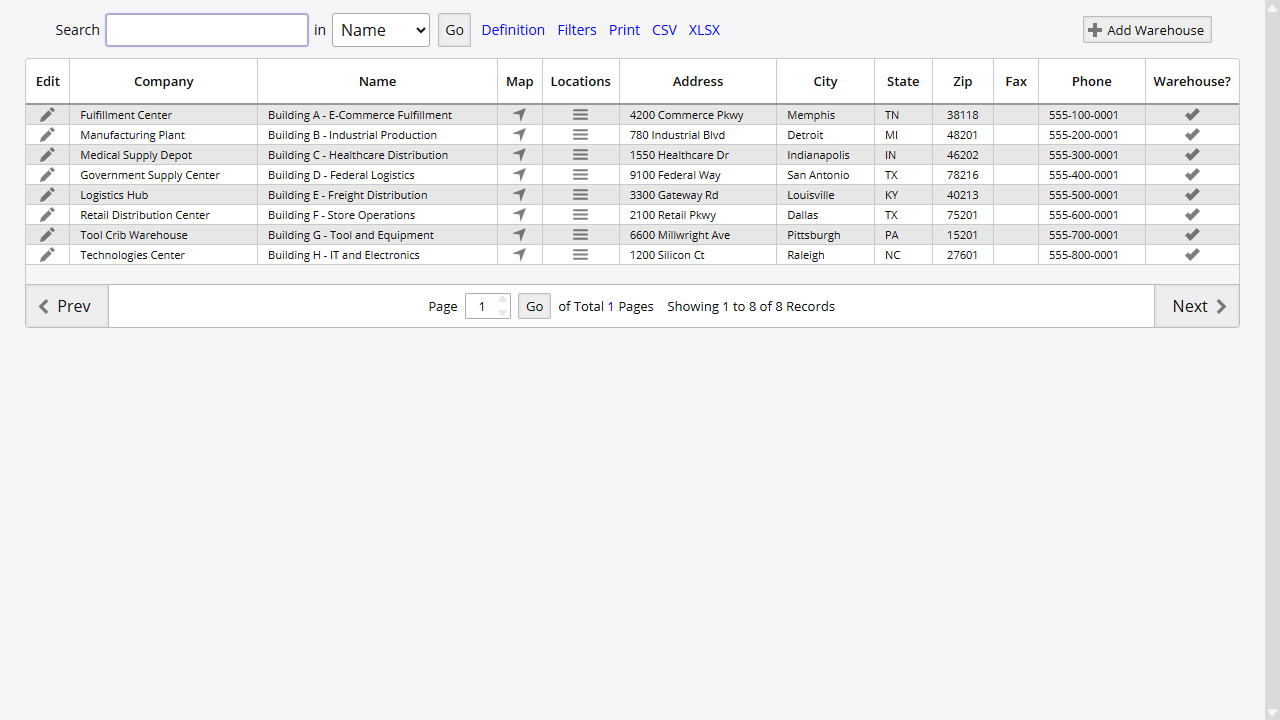
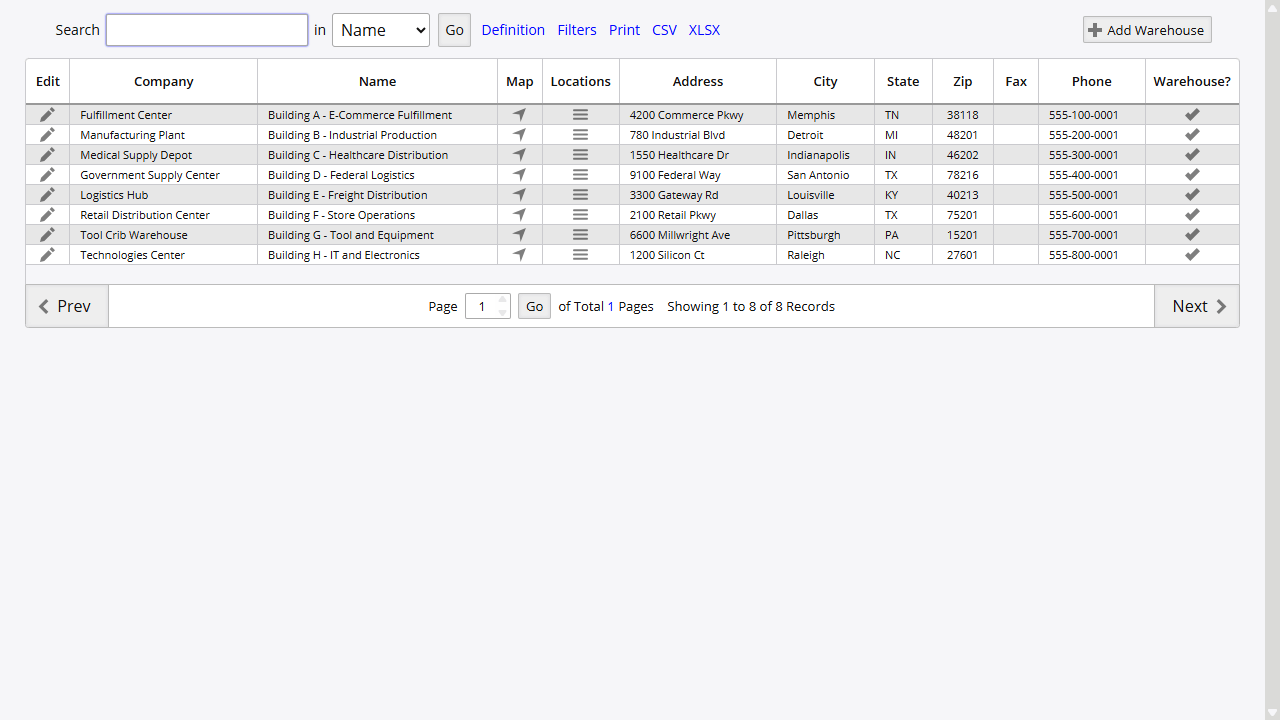
The Warehouses List provides centralized management of all warehouse facilities:

Accessing Warehouse Management

  1. Navigate to Inventory → Inventory → Warehouses
  2. View complete list of configured warehouses
  3. Access warehouse-specific functions and reports
  4. Manage warehouse creation and modification

Warehouses List

Warehouse Information Display

  • Warehouse Name: Descriptive name for each facility
  • Location Details: Physical address and contact information
  • Operational Status: Active/inactive warehouse status
  • Configuration: Warehouse-specific settings and parameters

Creating New Warehouses

Warehouse Creation Process

  1. From the Warehouses list, click “Add Warehouse”
  2. Configure warehouse parameters:
    • Warehouse Name: Descriptive facility name
    • Location Information: Physical address details
    • Contact Details: Phone, email, and responsible personnel
    • Operational Settings: Warehouse-specific configurations
  3. Save Configuration: Commit warehouse settings to system

Warehouse Configuration Options

  • Company Location Integration: Link with company location records
  • Operational Parameters: Configure warehouse-specific settings
  • Security Integration: Establish warehouse access permissions
  • System Integration: Connect with inventory and operational systems

Warehouse Assignment and Item Control

Item-to-Warehouse Assignment

The Warehouse Assignment system controls which inventory items are available in each warehouse:

Assignment Process
  1. Access Assignment Interface: Navigate to item warehouse assignment
  2. Item Selection: Specify item for warehouse assignment
  3. Warehouse Selection: Choose warehouses where item will be available
  4. Assignment Configuration: Set warehouse-specific parameters
Assignment Interface Features
  • Item Identification: Clear display of item ID and description
  • Warehouse Grid: Visual interface showing all available warehouses
  • Active Stock Indicators: Show warehouses with current inventory
  • Bulk Assignment: Efficient assignment to multiple warehouses

Assignment Rules and Constraints

Active Stock Protection:

  • Warehouses with active stock cannot be disabled for an item
  • System prevents assignment removal when inventory exists
  • Visual indicators show warehouses with active inventory
  • Protection against accidental inventory isolation

Assignment Validation:

  • Real-time validation of warehouse assignments
  • Automatic updates to inventory availability
  • Integration with procurement and ordering systems
  • Audit trail for all assignment changes

Warehouse Integration Features

Restocking Levels Integration

  • Direct Access: Quick access to reorder level management
  • Item-Specific Settings: Warehouse-specific restocking parameters
  • Automated Alerts: Low stock alerts by warehouse location
  • Procurement Integration: Automatic purchase order generation

Operational Integration

  • Receiving Operations: Warehouse-specific receiving workflows
  • Shipping Operations: Warehouse-based fulfillment processes
  • Transfer Operations: Inter-warehouse transfer capabilities
  • Reporting Systems: Warehouse-specific reporting and analytics

Location Management

Warehouse Locations

The Warehouse Locations system provides detailed bin and location tracking within each warehouse:

Accessing Location Management

  1. Navigate to Inventory → Inventory → Warehouse Locations
  2. Select target warehouse from warehouse selector
  3. View all locations within selected warehouse
  4. Access location-specific functions and reports

Location Display and Organization

  • Location Hierarchy: Organized structure for efficient navigation
  • Location Codes: Standardized location identification system
  • Status Tracking: Active/inactive location status
  • Capacity Information: Location-specific capacity and constraints

Location Creation and Management

Adding New Locations

  1. From the Warehouse Locations interface, click “Add Location”
  2. Configure location parameters:
    • Location Code: Unique identifier within warehouse
    • Description: Descriptive location information
    • Location Type: Classification (bin, rack, shelf, etc.)
    • Capacity Settings: Size and capacity constraints
  3. Save Location: Commit location to warehouse structure

Location Configuration Options

  • Location Hierarchy: Establish parent-child location relationships
  • Access Controls: Location-specific security and permissions
  • Operational Settings: Location-specific operational parameters
  • Integration Settings: Connection with picking and putaway systems

Location Label Generation

Professional Location Labeling

The system provides integrated location label generation:

Label Generation Process
  1. Access Label Utility: Navigate to Location Labels utility
  2. Warehouse Selection: Choose target warehouse
  3. Location Range: Specify locations or use “All” for complete warehouse
  4. Label Generation: System creates professional location labels
Label Features
  • Barcode Integration: Location barcodes for scanning efficiency
  • Professional Format: Standardized appearance for facility consistency
  • Batch Processing: Efficient generation of multiple location labels
  • Print Optimization: Formatted for standard label printers

Automated Location Creation

For efficient warehouse setup, the system includes automated location creation:

Bulk Location Creation
  1. Location Naming: Specify naming convention
  2. Number Range: Set beginning and ending location numbers
  3. Warehouse Assignment: Target warehouse for new locations
  4. Batch Creation: System automatically creates location sequence
Creation Parameters
  • Sequential Numbering: Automatic sequential location numbering
  • Consistent Formatting: Standardized location code formatting
  • Warehouse Integration: Automatic assignment to selected warehouse
  • Validation: Duplicate location code prevention

Advanced Warehouse Operations

Warehouse Purging and Decommissioning

The Warehouse Purge system provides complete warehouse decommissioning capabilities:

Purge Process and Security

Access Requirements:

  • Administrative Access: Requires full administrative permissions
  • Security Validation: Multiple confirmation requirements
  • Read-Only Protection: Disabled in read-only system mode
  • Audit Logging: Complete logging of purge operations

Purge Operations

Comprehensive Purge Process:

  1. Warehouse Selection: Choose target warehouse for purging
  2. Confirmation Process: Multiple confirmation steps to prevent accidents
  3. Inventory Clearing: Remove all active inventory from warehouse
  4. Order Processing: Close all outstanding orders for warehouse
  5. Data Cleanup: Complete removal of warehouse operational data

Purge Validation:

  • Double Confirmation: Two-step confirmation process for safety
  • Irreversible Warning: Clear warning about permanent nature of operation
  • Administrator Only: Restricted to users with full administrative access
  • Error Prevention: Validation to prevent accidental warehouse deletion

Warehouse Security and Access Control

Permission Management

Warehouse-Level Security:

  • Warehouse Access: Control user access to specific warehouses
  • Operational Permissions: Warehouse-specific operational rights
  • Location Management: Control over location creation and modification
  • Purge Authorization: Administrative control over warehouse purging

Security Integration:

  • User Role Integration: Integration with system-wide user roles
  • Department Controls: Department-specific warehouse access
  • Audit Trails: Complete logging of warehouse access and operations
  • Session Management: Warehouse selection persistence across sessions

Operational Security

Data Protection:

  • Access Logging: Complete audit trail of warehouse operations
  • Change Tracking: Detailed logging of warehouse and location changes
  • Permission Validation: Real-time permission checking for operations
  • Error Prevention: Validation to prevent unauthorized operations

Multi-Warehouse Operations

Warehouse Selection and Navigation

Session-Based Warehouse Management

  • Warehouse Persistence: Selected warehouse maintained across sessions
  • Quick Switching: Efficient warehouse selection interface
  • Context Awareness: System operations respect selected warehouse context
  • Default Settings: User-specific default warehouse configuration

Cross-Warehouse Operations

  • Transfer Management: Inter-warehouse inventory transfers
  • Consolidated Reporting: Reports spanning multiple warehouses
  • Global Inventory: System-wide inventory visibility and management
  • Resource Sharing: Shared resources across warehouse locations

Warehouse Integration with Inventory Operations

Receiving Integration

  • Warehouse-Specific Receiving: Receiving operations tied to warehouse context
  • Location Assignment: Automatic location assignment during receiving
  • Validation: Warehouse-specific validation during receiving operations
  • Audit Trail: Complete receiving audit trail by warehouse

Shipping Integration

  • Fulfillment Optimization: Warehouse-based order fulfillment
  • Inventory Allocation: Warehouse-specific inventory allocation
  • Shipping Coordination: Warehouse-based shipping operations
  • Performance Tracking: Warehouse-specific shipping performance metrics

Best Practices and Recommendations

Warehouse Organization

  1. Logical Structure: Organize warehouses by geographical or operational logic
  2. Consistent Naming: Establish consistent warehouse and location naming conventions
  3. Capacity Planning: Plan warehouse and location capacity based on operational needs
  4. Security Planning: Implement appropriate security controls for each warehouse

Location Management

  1. Hierarchical Organization: Use logical location hierarchies for efficient operations
  2. Standardized Codes: Implement standardized location coding systems
  3. Label Maintenance: Maintain current and readable location labels
  4. Regular Audits: Conduct regular location audits to ensure accuracy

Operational Efficiency

  1. Training Programs: Implement comprehensive user training on warehouse systems
  2. Standard Procedures: Establish standard operating procedures for warehouse operations
  3. Performance Monitoring: Regular monitoring of warehouse operational performance
  4. Continuous Improvement: Regular review and improvement of warehouse processes

Troubleshooting Common Issues

Access and Permission Issues

  • Problem: Users cannot access specific warehouses or locations
  • Solution: Verify user permissions and warehouse assignments, check security group memberships
  • Prevention: Regular user permission audits and training

Location Management Problems

  • Problem: Location labels not printing or incorrect location assignments
  • Solution: Verify label configuration, check warehouse selection, ensure location exists
  • Prevention: Regular location audits and label system maintenance

Warehouse Assignment Issues

  • Problem: Items not available in expected warehouses
  • Solution: Check warehouse assignments for items, verify active stock status
  • Prevention: Regular warehouse assignment reviews and item availability audits

The Locations and Warehouses system provides comprehensive facility management capabilities, enabling efficient multi-warehouse operations through detailed location tracking, robust security controls, and seamless integration with all inventory management processes.

On this page