Security Controls for Inventory Teams
Protect warehouse data with permission controls, sign-in options, and clear audit history without slowing down daily work.
Role-Based Access by Warehouse and Function
InventoryPro keeps access tied to the job a person actually does. Managers can decide which screens, reports, and actions belong to buyers, warehouse staff, supervisors, and outside partners.
- Limit users to specific warehouses, suppliers, or customers
- Control access to modules, reports, and data exports separately
- Keep customer and vendor views isolated from internal data
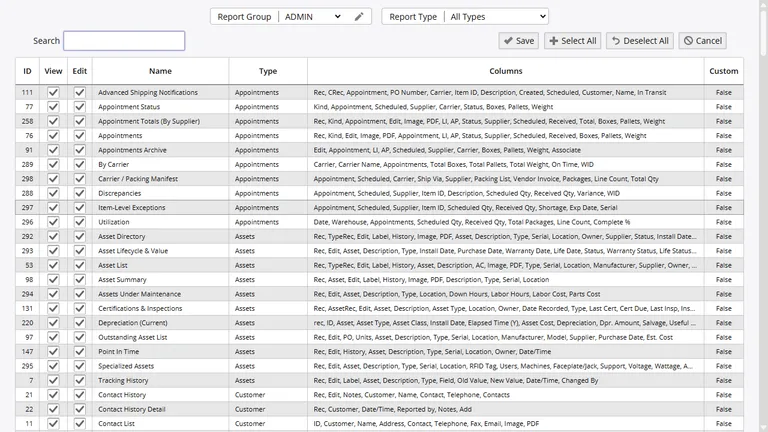
The goal is simple: each person sees the records they need to do the job and nothing extra.
Single Sign-On Options
If your business already uses a central login system, Inventory Pro can connect to it. That means warehouse and office users can sign in with the same identity they use for other business tools instead of tracking another separate password.
Teams can choose the SSO method that fits their environment, including Active Directory and smart card based options where that is already part of the sign-in process.
Password and Session Rules
Admins can set password length, reset rules, history requirements, and lockout thresholds to match company policy. Temporary passwords can be forced to change on first use.
Session settings can time out idle users, rate limit failed sign-in attempts, and lock accounts after repeated failures. That helps protect warehouse terminals and shared devices.
Password Rules
Minimum length, reset timing, history checks, and forced change after admin reset.
Session Limits
Idle timeout, failed login limits, automatic lockout, and admin unlock actions.
Approval Rules for Sensitive Activity
Critical actions such as purchase orders, shipping orders, and work orders can be routed through approval chains before they take effect. That keeps large changes visible and leaves a clear sign-off trail behind them. Learn more about approval workflows and notifications.
Audit Trail and Change History
Inventory Pro records user actions with the time and transaction detail, which makes it much easier to answer the common question of who changed what and when.
That change history supports internal reviews, outside audits, and everyday troubleshooting when a warehouse team needs to trace an unexpected movement or setting change.
Limited Access for Customers and Vendors
Sometimes outside parties need visibility without full system access. Vendor accounts can be limited to their own items and purchasing records, while customer accounts can be limited to their orders, status, and relevant stock details.
Those limits also apply to reports, which helps teams share the right information without opening up unrelated warehouse data.
Protect Inventory Data Without Slowing Work
Use one cloud system for warehouse activity and user control so your team can stay fast without giving up clear access rules and audit history.